Build and Defend Your Raft Guides
From a four-plank spawn to a cannon raft that actually keeps its chests.
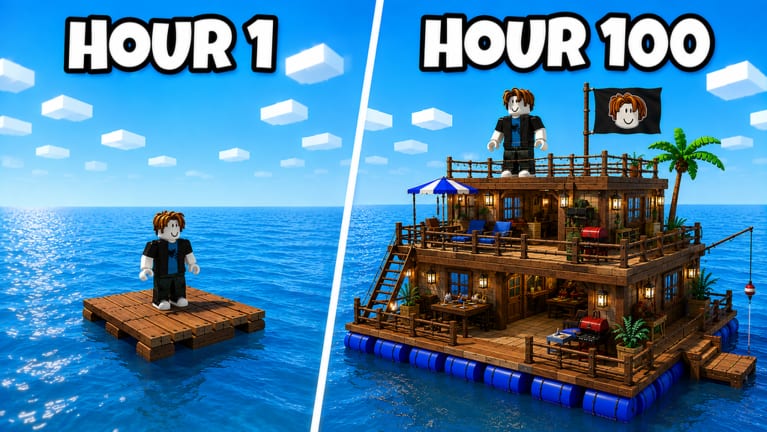
This hub is the map of every how-to on the wiki. Build and Defend Your Raft does not hide the fantasy: start on a crying avatar’s pallet, then spend a session turning that square into a two-story wooden keep with spikes, plates, cannons, and a chest room. The pain is the middle. You run out of wood, the table will not craft walls yet, and a raider walks onto an open deck.
Use the pages below in order if you just installed Roblox. Skip ahead if you already have a second floor and only need raid timing.
Start here
- Getting Started — spawn loop, first resources, what to ignore in hour one.
- Controls — PC, console, and mobile habits so you can build and fight without fighting the HUD.
- How to build your raft — deck size, barrels, floors, and why a 3x3 beats a long skinny dock.
Keep loot, then take loot
- How to defend — walls, spikes, cannon lines, and chest placement.
- How to raid — when to leave, how to break in, how to get home with stolen crates.
- Crafting Table — the upgrade that unlocks every better piece of gear.
- How to get resources — water crates, hull harvest, and raids that actually profit.
- How to protect loot — chest rooms, door discipline, and AFK rules.
Pair these with the tier list so you are not guessing which wall tier is worth the wood. Raiders covers loadouts and solo versus crew. Tools are checklists you can keep open on a second screen.
What players actually search
Most traffic is not lore. It is how to get more wood, how to play the first night, how to find the Shop redeem box, how to protect a chest, how to complete a Saturday patch goal, and how to beat the raft next door. Those intents now have their own pages instead of a pile of thin clones.
Official media shows the fantasy clearly: hour one is a four-plank island; hour 100 is lanterns, a palm, furniture, and a fishing boom. Cannons on the promo raft fire while a face flag flies. That is the north star. Your first session should not chase the palm. It should chase table tiers, a square footprint, and a closed perimeter.
How to use this wiki during a session
- Load in, then glance at codes if it is Saturday.
- Follow Getting Started until the Crafting Table has moved up a tier.
- Lock a layout from raft layouts before you add chairs.
- If the lobby is spicy, switch to how to defend and park loot in the core.
- Only then open how to raid.
Scripts are optional and risky. If you still want them, read how to use scripts instead of pasting the first loadstring you see.
Saturday rhythm
Raft Pirates ship new updates every Saturday. After a patch, recipes, wall HP, or raid tools can shift. Recheck this hub, the Saturday patch log, and the tier list before you rebuild a whole deck. A layout that worked last week might leak if spike pieces changed.
Official links, the Roblox place, and the Raft Pirates group live on the links hub. This wiki is unofficial. When a patch note and a guide disagree, the live Shop and the live table win.
Frequently Asked Questions
Quick answers for raft builders and raiders.
Which guide should a new player open first?
Start with Getting Started, then Crafting Table and how to build.
Do I need a video to follow these guides?
No. These pages are written from the official loop, promo screenshots, and the live Roblox listing. We only embed a YouTube video when a real ID exists.