Build and Defend Your Raft Controls and HUD
Place walls, aim cannons, and open the Shop without fighting the input on every device.
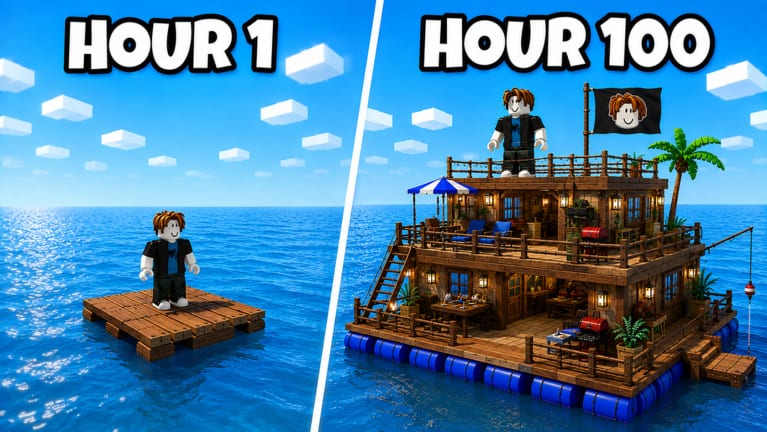
Build and Defend Your Raft runs on Roblox, so the bones of movement are the same as every other experience: WASD or thumbstick to walk, jump to clear a barrel, camera to look. The friction is the build loop. You need to place tiles, upgrade the Crafting Table, fire a gather tool, and still turn around when a raider climbs your ladder.
This page is a device-by-device habit guide, not a fake keybind table. Raft Pirates have not published a unique keymap. If a Saturday patch adds one, it will land on Saturday patches. Until then, treat Roblox defaults as true and bind your brain around the HUD instead of hunting a secret F-key.
PC habits that save rafts
Keep the camera slightly high. Official rafts are two stories with ladders. If you play in first-person with the lens on your feet, you will miss a swimmer. Third-person with a raised pitch lets you see the spiked skirt and the chest room door at once.
Shift-lock or a comparable lock-on helps when you are kiting along a wall. It hurts when you are placing floor tiles, because the cursor fights the grid. Toggle it off for building, on for raids.
Put the gather tool and a cheap melee or starter gun on the first two hotbar slots. When someone boards, you do not want to scroll through flags. The gear list is the upgrade path; the hotbar is the panic path.
The Shop is how you redeem codes. Find that button in a quiet minute, not during a board. On PC it is usually a side GUI icon. Hover once, remember the art, and leave it alone until Saturday.
Console
Thumbstick walk, camera on the other stick, and the Roblox build placement flow (trigger to place, bumpers to rotate if the piece supports it). The danger is sprinting off the pallet. Your spawn deck is tiny. Hold the camera so the horizon is visible and stop walking before the barrels.
Use the Roblox quick menu if a button is swallowed by the experience GUI. If you cannot open the Shop, you cannot redeem a future code. Practice the path after you wall the chest, not before.
Mobile
Thumb on the left for move, right for camera, jump button where Roblox put it. Building on a phone is slower. Zoom out until you can see all four edges of your square. Place walls in a ring while standing in the middle so you do not accidentally put a tile in the ocean.
Auto-jump and giant GUI buttons will eat taps meant for the Crafting Table. If the table will not open, you are hitting a hotbar slot. Pause, lock the camera, then tap the table again. Mobile raiders should not swim with a cluttered bar — drop cosmetics into storage first, as the loot checklist says.
Combat inputs
Defending is about turning, not about a special Q-ability the wiki invented. When you hear footsteps, look at the open side of the deck. Cannons in promo art sit on corners and roofs. Man them only if someone else is watching the ladder. A roof gunner who cannot see the door loses the chest.
Raiding is swim, climb, break, grab, leave. Do not emote on the victim’s roof. Bind your brain to the exit: the same ladder you climbed is the first place a defender will camp. How to raid covers the route; this page only reminds you to keep a jump and a gather tool ready so you can yoink a crate and go.
HUD pieces worth naming
- Shop / redeem. Codes. Empty today.
- Crafting Table. Progression. See the table guide.
- Hotbar. Panic tools.
- Build ghost. The translucent tile you place. If it is red, you are clipping a barrel or hanging off the hull.
There is no reason to keep a script GUI on screen while you learn these. A floating executor menu steals the same taps you need for walls. If you still want one, read how to use scripts and hide the menu after you toggle loot.
Accessibility and session comfort
Lower graphics if the water hides swimmers. Bloom and reflections look nice on the hour-100 raft and hide a dark avatar on the lip. Raise volume enough to hear jumps. Eighteen-player servers are noisy; footsteps still matter.
If you play in a crew, assign who is allowed to touch the table. Two people rotating a wall piece at once is how you get a hole. Solo versus crew sets that rule.
Once the inputs feel boring, you are ready to build for real. Go back to Getting Started or jump to how to build and lock a square footprint before the next raid timer in your head goes off.
Frequently Asked Questions
Quick answers for raft builders and raiders.
Did Raft Pirates publish a unique keymap?
Not a public one. Use Roblox defaults and the HUD habits on this page until a Saturday patch says otherwise.
How do I open codes on mobile?
Load the raft, tap the Shop icon, then find the redeem box. Step-by-step sits on how to redeem.
Should I use shift-lock?
On PC, yes for fights, no for placing tiles. Toggle it instead of leaving it stuck.